
How to create a website from scratch in 11 steps (for beginners)
01. Define your website's purpose
Every great site starts with a clear website goal and understanding your audience. Know what you’re here to do—selling products, sharing knowledge or building a community. A clear website purpose keeps you on track as you build.
Next, get to know your audience. Who are they and what do they need? Create personas based on their demographics, interests and challenges. Use surveys or chats to gather helpful insights. The better you understand them, the more your site will grab attention and keep visitors coming back.
Want your website to stand out? Focus on what makes you different. Start by exploring other sites in your market. How do they look? How do they work? Take notes on what they’re doing well and where they fall short. Spot trends, find gaps and think about how you can offer something better.
-
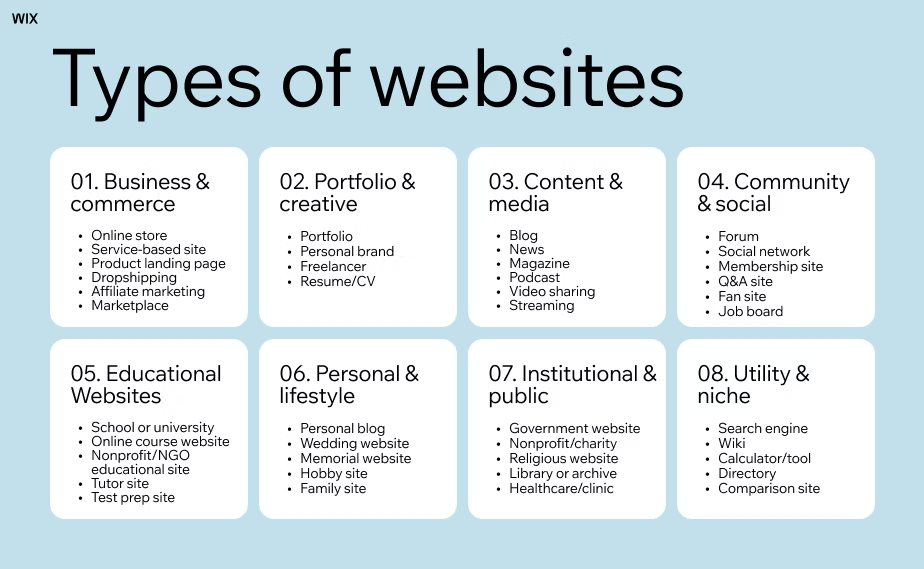
Business and commerce websites: These websites are built to get things done. Selling products through an online store on an eCommerce platform, booking services or giving customers a clear idea of what a company offers—business websites focus on clarity and conversion. From local shops to national brands, they share pricing info, service details, testimonials and contact forms. A solid privacy policy is a must and adding a chat feature makes staying in touch with customers quick and easy.
-
Creative and portfolio websites: If you’re a photographer, designer, writer or musician, your website should reflect your style. A strong portfolio website might include a photo gallery to highlight your best work, a blog to share your process and social media links to grow your audience. For freelancers or creative agencies, these sites act as living resumes—personal, expressive and designed to attract the right clients.
Content and media websites: These sites focus on sharing stories, insights or entertainment. A niche blog is a classic example, often packed with how-tos, lists or essays. Content-heavy websites might also include videos, podcasts or a news section. If you’re publishing regularly and want people to keep coming back, make sure to have clean navigation, a search tool and maybe even a members area for exclusive stuff like newsletters.
Educational websites: School homepages, online courses and resource hubs make learning easier for everyone. These sites include lessons, PDFs, video lectures or even certification programs. A clear layout and simple navigation keep things user-friendly, while member log-ins can track progress. Many also include blogs or FAQ sections to answer questions and explore topics in more detail.
Personal and lifestyle websites: From fitness journeys to recipes or travel stories, personal websites come in all styles. A couple planning their wedding might create an event website or a wedding website to share info and collect RSVPs. Some people prefer a one page website—simple and streamlined—perfect for a resume, bio or link-in-bio page. You can add a photo gallery, a blog or just a few social media links to keep it personal and relatable. Learn more: How hard is it to make a website?
Institutional and public service websites: Built for trust and accessibility, these sites are for schools, governments, charities and community groups. A nonprofit website might include donation forms, mission statements and volunteer sign-ups. A church website could share service times, livestreams and upcoming events.
Utility and niche websites: Some websites have one job—and nail it. From comparing insurance plans to calculating a mortgage, utility websites focus on function. These can be custom tools, SaaS platforms, directories, or crowdfunding sites. With the right strategy, you can also monetize your website by offering premium features, ads or partnerships.
Some sites serve more than one purpose, so it’s important to focus on your main goal. For example, Cleverchefs uses its site to tell its brand story. While it attracts new bookings, the main focus is helping prospects understand what makes Cleverchefs unique. Their site reflects their company’s ethos, making it a powerful tool to connect with clients who share their values
02. Choose your website builder
02. Choose your website builder
Customizability: A good website builder should offer the customization you need to start and design your website according to your unique brand and vision. For example, do you envision creating a static website or a dynamic one? Look for builders that offer a range of layout options, as well as the flexibility to tweak the design and functionality to your liking. Wix, for instance, offers hundreds of designer-made templates in addition to AI-powered site creation that can be easily modified for your brand. Furthermore, its WYSIWYG (what you see is what you get) editor lets you preview your changes in real time as you go.
Back-office tools/business capabilities: Beyond just website design, when it comes to starting a website, a website builder should provide the back-office tools that you need. This might include features like eCommerce functionality if you need to create your own eCommerce website, inventory management, appointment scheduling and customer relationship management (CRM) tools. Create your list of must-haves and the tasks that need automating as you evaluate your options.
AI capabilities: AI is all the rage these days—and for good reason. When you’ve got a full-time job or business to run, AI tools can simplify the process of creating and maintaining your website. For example, Wix’s website builder can help you produce a fully functional website in minutes using AI. You can also choose from a variety of other AI features that support every part of your business, whether you need an extra hand with customer support, or a creative partner for brainstorming new marketing ideas.
Third-party integrations: Chances are, you already have a favorite platform for emails, advertising or other functions—or perhaps you’re a retailer who wants to expand to new sales channels like Amazon. Seek website builders that integrate with your favorite tools and channels, or that offer sufficient alternatives. Explore your options in marketplaces like Wix’s App Market. (Note that you can also use Wix Headless to access Wix tools from any application.)
Security: Website security is paramount to protect your site and user data. A reliable website builder should offer security features like SSL certificates, regular backups and security monitoring to safeguard against cyber threats and data breaches.
Speed: Website loading speed significantly impacts user experience and SEO rankings. As page load time goes from one second to five seconds, the probability of a visitor bouncing increases by 90%. Choose a website builder known for fast-loading websites. Look for built-in capabilities like content delivery networks (CDNs), which speed up content delivery; streamlined code; and tools like an image compressor to optimize visuals for faster load times.
Reliability: A reliable website builder should provide consistent uptime and minimal downtime. Read reviews and check the builder’s uptime statistics to give yourself peace of mind knowing that your website and online presence will be accessible to visitors around the clock.
Support: Most of us don’t realize how important support is until it’s dire. As you evaluate your options, you’ll want to check that customer care is accessible in your time zone and that you can resolve issues before they snowball. Look for website builders that offer various support channels, including a knowledge base and self-help resources. For example, Wix has a 24/7 support team as well as a robust library of how-to articles, YouTube videos and communities to help you find whatever answers you’re looking for.
03. Pick and register a domain name